
English
- English
- বাংলা
Categories
-
 Science Projects
-
 Sensor & Modules
- Sensors
- Modules
-
 Basic Components
-
 Development Boards
-
 Robotic Parts
-
 Drone Parts
-
 Tools & Accessories
-
 Power Sources
-
 Kits & Combo
-
 IC & Microchip
-
 Cables & Connectors
-
 Audio Components
-
 Our Services
Categories
shopping_cart0
Cart
Cart
There are no more items in your cart
Color Sensor
There is 1 product.
Showing 1-1 of 1 item(s)
Color Sensor Module Category — Perfect for Students & DIY Electronics
Welcome to the Color Sensor Module category at Bigyan Project (বিজ্ঞান প্রজেক্ট). This page is dedicated to students, hobbyists, and makers across Bangladesh who are looking for reliable, budget-friendly color sensor modules for science fair projects, school assignments, and DIY electronics. Here you’ll find clear buying guidance, practical wiring notes, common applications, example projects, and tips to choose the right module for your needs.
Why Choose a Color Sensor Module?
- Accurate color detection for robotics, line-following with color identification, and object sorting.
- Easy integration with Arduino, ESP32, Raspberry Pi and other microcontrollers — great for beginner-friendly projects.
- Low cost and compact — ideal for student budgets and portable prototypes.
- Versatile — used in color sorting machines, smart lighting projects, educational kits, and research prototypes.
Common Types & Popular Chips
Most modules you’ll see in the market use one of a few common sensor chips. Knowing these helps you pick the right module:
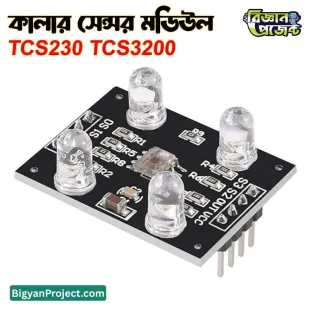
- TCS3200 / TCS230 — frequency-output color sensors, easy to read with Arduino PWM capture.
- TCS34725 — I²C RGB sensor with built-in IR blocking and white LED; more accurate and easier to read via I2C.
- Analog RGB photodiodes — simple, low-cost modules that output analog voltages for each color channel.
How to Choose the Right Module (Student-Friendly Checklist)
- Interface: I2C modules (like TCS34725) are easier for multiple sensors on one bus; PWM/analog modules may need extra pins.
- Accuracy: For science projects requiring precise color readout, prefer modules with IR filters and calibration (e.g., TCS34725).
- Lighting: Consider modules with built-in white LEDs or plan to add controlled lighting — consistent lighting improves repeatability.
- Voltage & Logic Level: Check 3.3V vs 5V compatibility for your microcontroller (ESP32/Raspberry Pi use 3.3V; many Arduino boards use 5V).
- Library Support & Tutorials: Choose modules with existing Arduino or Python libraries to speed up development — this is very helpful for students.
Quick Wiring Guide (Arduino / ESP32 / Raspberry Pi)
Below are general wiring notes — always check the module’s datasheet for pin names:
- I2C Modules: Connect SDA → SDA pin, SCL → SCL pin, VCC → 3.3V/5V (match board), GND → GND.
- PWM / Frequency Modules (TCS3200): Connect OUT to an interrupt-capable pin on Arduino, and connect S0–S3 to digital pins for scaling and filter selection.
- Analog RGB Modules: Connect R/G/B outputs to analog input pins (A0–A5 on Arduino), and read analog voltages then normalize in code.
Student Project Ideas (Bangladesh Friendly)
- Color-sorting conveyor: Build a tabletop sorter that separates colored beads or paper by color — ideal for science fair demos.
- Interactive color detector: A handheld detector that displays the detected color name on an LCD — perfect for classroom labs.
- Smart plant labeler: Detect color changes in leaves for plant health indicators and log results with an ESP32 to Google Sheets.
- Traffic signal simulator: Use color sensors to detect colored cards and change lights in a miniature traffic model demonstrating automation.
- Art robot: A robot that reads color patches and mixes paint or selects markers — fun for creative STEM projects.
Example Code Snippets & Libraries
Students benefit from ready libraries. For Arduino look for libraries named TCS34725, TCS3200, or general Adafruit_Sensor wrappers. For Raspberry Pi, sensor support in Python via python-periphery or manufacturer libraries makes prototyping fast.
Classroom Tips — Prepare For Fair Evaluation
- Calibration: Calibrate your sensor with known color cards (white, red, green, blue) and record baseline readings.
- Consistent Lighting: Use the same light source for each trial and document lighting conditions in your report.
- Repeatability: Run multiple readings per sample and show average ± standard deviation in your results.
- Documentation: Keep wiring diagrams, code comments, and test photos — judges appreciate clear reproducibility.
Why Buy from Bigyan Project (বিজ্ঞান প্রজেক্ট)?
At Bigyan Project, we curate modules tested with Arduino and ESP32 boards commonly used by Bangladeshi students. We provide clear product descriptions, wiring guides, and beginner-friendly tutorials so you can focus on learning and building. Our selection includes budget kits and higher-accuracy sensors — ideal for both classroom and competitive science fair projects.
Shipping, Support & Local Considerations
We know local students need fast support. Check product pages for stock status, estimated delivery within Bangladesh, and available tutorials in English and Bengali. If you need help selecting the correct sensor for your board (Arduino UNO, Nano, ESP32, or Raspberry Pi Pico), our product pages and support team provide compatibility notes and code examples.
Frequently Asked Questions (FAQ)
- Q: Which color sensor is best for school projects?
- A: For ease of use and accuracy, I²C modules like the TCS34725 are recommended. They have good library support and built-in filters, which reduces calibration effort.
- Q: Can I use a color sensor with an ESP32?
- A: Yes. Use I2C modules on the ESP32’s SDA/SCL pins or digital/PWM-capable pins for frequency-based sensors. Ensure sensor voltage matches your board (3.3V recommended).
- Q: Do I need to control lighting?
- A: Consistent lighting dramatically improves results. Use the module’s onboard LED when available or place sensors in a fixed light enclosure for repeatable readings.
- Q: Are there beginner kits for learning?
- A: Yes — Bigyan Project offers starter kits and project guides tailored for students, including wiring diagrams and sample Arduino/Python code.
Project Example — Simple Color Name Detector (Overview)
Steps students can follow: 1) Wire the color sensor to Arduino, 2) Load a sample library sketch, 3) Calibrate with sample color cards, 4) Map RGB readings to color names with thresholds, 5) Display results on an LCD or send to serial/phone app. This makes a great science fair demo with reproducible data.
Technical Specs to Check Before Buying
- Operating Voltage (3.3V / 5V)
- Interface (I2C / PWM / Analog)
- Detection range and response time
- Presence of IR filter and onboard LED
- Available libraries and example code
Final Notes
This category page is designed to help Bangladeshi students and DIY enthusiasts find the best color sensor modules quickly and confidently. Browse our product listings, read the specs, download sample code, and start building your next science project today with Bigyan Project (বিজ্ঞান প্রজেক্ট). Need help choosing? Contact our support for board-specific recommendations and project tips.
Good luck with your project — happy making!
color sensor, color sensor module, TCS3200, TCS34725, color detector, RGB sensor, color sensor for Arduino, color sensor for ESP32, school science project color sensor, DIY color sensor kit, color sorting sensor, Bigyan Project color sensor, বিজ্ঞান প্রজেক্ট কালার সেন্সর
arrow_upward